Create a Record of Employment (ROE)
To amend an ROE produced, go to Amend a Record of Employment (ROE).
The ROE is used by Service Canada to determine whether a person qualifies for Employment Insurance benefits, how much they will receive, and the length of time they will receive the benefits.
An employer must issue an ROE within a specified time of an employee's interruption of earnings. See What is my deadline for issuing an ROE?. Dayforce can produce ROEs with your regular payroll or between regular paydays.
If you require an ROE produced without a payment between payroll runs, create an ROE run.
Note: A Record of Employment (ROE) cannot be generated for an employee with no insurable earnings.
Note: Dayforce does not produce ROEs based on QPIP premium paid. If a Quebec employee requires an ROE for parental leave, the employer can create one on the RQAP website. Please visit: http://www.rqap.gouv.qc.ca/.
Prerequisites
The employee has insurable earnings.
Note: The last 60 pay periods of EI history are available based on the most recent payroll run. For editing pay period EI history we can modify the current year and the immediate prior year (ie we cannot go back 2 calendar years). Special considerations may apply. Contact Customer Care for additional assistance.
Video
Tasks
 Create
-
Are any payments required to the employee along with the Record of Employment? For example: Vacation pay or termination pay.
- If yes, proceed with your regular run or create an extra run based on the payment date for the final pay.
- If no, create an ROE run.
Note: For questions about paying out vacation pay, please contact your local Employment Standards office for assistance.
-
Click the Pay Period menu and click the Enter button for the pay period you want to work with.
- Open the Status Change / ROE page.
- From the Employee List, select the employee for whom an ROE is required.
-
In the Status Change Options section, select the appropriate options for the selected employee. For more information, see Status Change Options.
-
Click Next.
The ROE form fields appear on the Employee Status Change page. Some information about the selected employee is automatically filled in on the form.
-
In the Employee Dates section,
- Verify the accuracy of the prepopulated information and correct or update it, as required.
-
Complete the remaining required data entry fields.
Tip: Review the ROE Field Information section at the bottom of this page for ROE box instructions.
- Click Save.
-
Ensure all other required tasks related to the payroll run are completed before submitting the payroll for processing.
-
Update insurable earnings for any corrections not yet entered.
- Regular or extra runs – For errors from the previous run, enter any manual or reversal entries required. For adjustments from prior pay periods, go to the Insurable Earnings Adjustments page. For more information see Adjust insurable earnings history.
- ROE runs - Go to the Insurable Earnings Adjustments page. For more information see Adjust insurable earnings history.
- Regular or extra runs – For errors from the previous run, enter any manual or reversal entries required. For adjustments from prior pay periods, go to the Insurable Earnings Adjustments page.
- Request a payroll preview on the Payroll Preview page.
-
If applicable, troubleshoot any ROE error messages.
-
Verify the accuracy of the DRAFT ROE as part of the payroll preview (ROE Forms link). See also ROE Forms Preview.
ROE forms become official as part of the back-office processes initiated when a payroll is submitted for processing. At that point, a serial number is issued. Until a serial number is attached, the form is a Draft, and can be used only for previewing and validation.
- Submit the payroll for processing (Process > Submit).
-
Do not mail a copy of the ROE to Service Canada.
Note: An electronic copy will be submitted securely to Service Canada on your behalf. Dayforce submits this file to Service Canada each business day at 1:00 pm EST. The release time of the ROE data is dependent upon the production run type.
-
(Optional) Distribute employee copies of the form printed from the Payroll Reports page.
or in your payroll package. Online electronic copies are available for your future reference for 13 months.Note: Employers filing electronic ROEs are exempt from printing a paper copy for the employee. Employees who have registered with the My Service Canada Account online service with Service Canada can also view and print copies of their electronic ROEs. To suppress the employee copy, contact your Customer Support Team.
Important: Inform your employees that they should not provide their paper copy to a Service Canada office when submitting their EI application if the ROE serial number begins with an S. This will delay their claim.
Important: If earnings are to be reported to a future pay period, contact your Customer Support Team for assistance to create the necessary pay periods and to ensure a supplementary entry is keyed by Dayforce before you transmit. This will prevent corruption to the EI or QPIP history file.
See also
- Amend a Record of Employment (ROE)
- ROE error messages -Troubleshooting
- ROE not produced - Troubleshooting
ROE - Field Information
Employee Dates
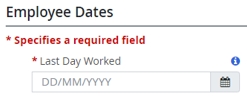
Last Day Worked - The last day the employee was on the job.
The Last Day Worked must be:
-
greater than the final pay period ending date of the employee’s last ROE,
-
later than or equal to the original First Day Worked on the Compensation tab.
, -
later than the employee’s birth date.
Employer Information

Box 3 - 7 - These fields are read only. If changes are required, contact your Customer Support Team.
Employee Information

Box 8 - 9 - Name, Address and SIN
These fields are read only. If changes are required, go to the Profile tab.
Box 10 - First Day Worked
The First Day Worked must be prior or equal to the Last Day for Which Paid.
This date may also be the rehire date if an ROE was previously issued.
The First Day Worked or Last Day for Which Paid must NOT overlap with the First Day Worked or Last Day for Which Paid for all previous ROEs issued by the same employer with the same Canada Revenue Agency (CRA) Payroll Account Number (Business Number) for the same Social Insurance Number unless it is an amended form. If the Payroll Reference Numbers on the ROEs are different, then an overlap is allowed and the ROE will not fail validation.
ROE Information

Box 2 - Serial No. of ROE Amended
Only displays when Amend is selected in the ROE Form field.
Box 11 - Last Day for Which Paid
The date must be greater than or equal to the First Day Worked and must fall within the pay period of the “Final Pay Period Ending Date” in Box 12.
The last day for which paid can be a the last regular work day, or an insurable sick or vacation day for time taken but it cannot be a stat holiday, unless the employee worked on the stat holiday.
Pay in lieu of notice and severance pay do not constitute insurable hours so the last day for which paid cannot include these earnings.
Box 12 - Final Pay Period Ending Date
Enter the end date of the final pay period that includes the date you entered in Box 11.
Box 13 - Occupation
Enter the employee's occupation (max. 40 characters in length). This is optional except in Quebec.
Box 14 - Expected Date of Recall
Options are:
-
Unknown (Powerpay Default)
-
Not returning
-
Recall Date
Recall Date is not allowed when Box 16 (Reason for Issuing ROE) is:
- Quit
- Retirement
- Dismissal
If a recall date is entered, Powerpay displays the error message “The date for Box 14, Expected Date of Recall cannot be entered if the Reason for issuing the ROE code is either Quit, Retirement, or Dismissal” and the page is not saved.
If Recall Date is selected but no date has been selected from the date picker or if an invalid date is entered, Powerpay displays the error message “Please provide a valid Expected Date or Recall.” and the page is not saved.
Box 16 - Reason for Issuing ROE
Reason For Issuing this ROE, contacts name, area code, and phone number cannot be blank.
Separation Payments
Box 17A - Vacation Payment

Important: Any amounts entered in this section are not processed or paid to the employee. They are manual entries on the Record of Employment only, and will display instead of any calculated amount. Any amounts owed to the employee must be entered on the Employee Timesheet.
The Vacation Pay field is automatically populated with the option ‘Included with each pay’ for the following pay types:
- Salary EE paid Vac Pay each pay
- Salary EE paid Vac Pay & Add’l Accum each pay
- Hourly EE paid Vac Pay each pay
- Hourly EE paid Vac Pay & Add’l Accum each pay
If required, amend to another selection.
Box 17A automatically populates with vacation pay paid in the current run when the ROE is requested on the same run.
If vacation pay was paid on the previous run, and the ROE request was missed or you are processing an Amended ROE, enter the vacation pay value in Box 17A.
This is applicable if the final pay was processed previously and only the ROE is required now, or if vacation pay was partially paid out previously and an additional amount is paid along with other termination pay. For example, pay in lieu of notice.
Tip: Run a Preview to confirm the amount appears correctly in Box 17A.
Box 17B - Statutory Holiday Pay

Up to 10 Statutory Holidays are allowed.
Report the amount you paid or will pay for each statutory holiday that falls after the ‘Last Day for Which Paid (Box 11)’, as well as the date of each statutory holiday. Do not include any statutory holidays that occurred before this date.
Note: Amounts paid on the current pay do not automatically populate to this section. They must be manually entered.
Box 17C - Other Monies
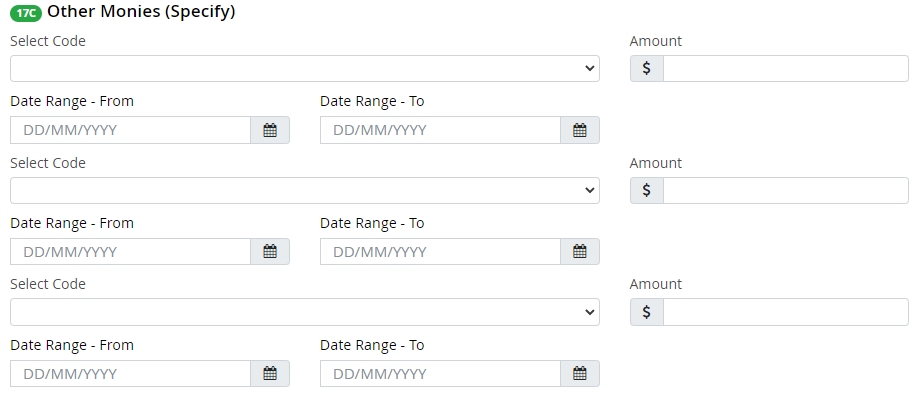
Enter any other payments or benefits other than vacation pay (Box 17A) or statutory holiday pay (Box 17B) that is paid or will be paid to the employee because of the separation, whether or not the amount is considered as insurable earnings.
Earning codes can be set up to automatically route to Box 17C. For example, Pay in Lieu of Notice or Severance pay. Run a Preview to confirm if the earning is already set to be reported here. If they are being reported automatically, do not enter them again in Box 17C.
Produce an amended ROE if additional monies were paid and not reported on the original ROE.
Payment Type is required if the Amount is provided and vice versa.
The amount is required if the Start and / or end Dates are provided.
The amount must be between $0.01 and $999999.99.
The amount may be up to 8 numeric characters and must have 2 digits after the decimal.
Additional Payments
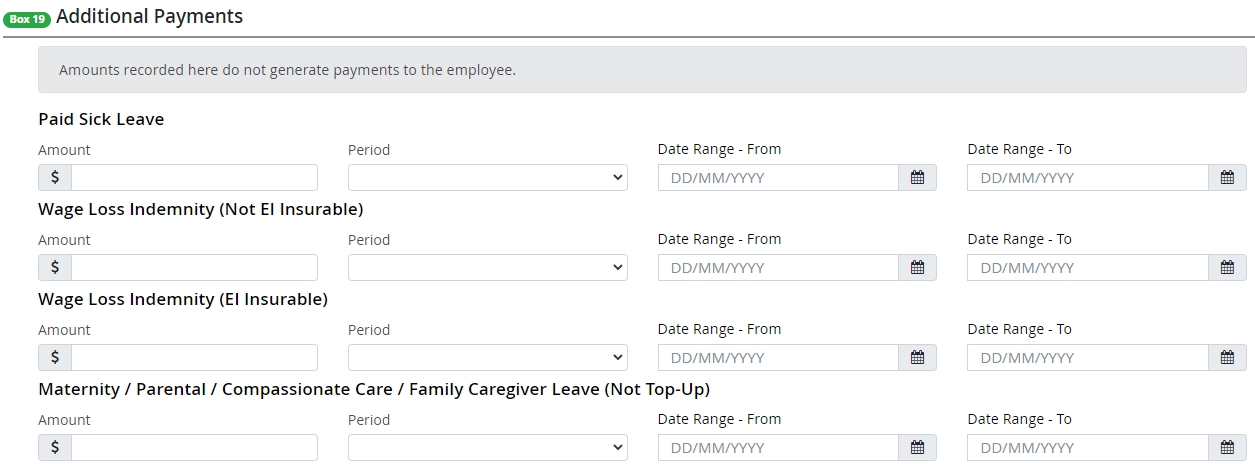
Amount required to be paid to an employee must be entered on the Employee Timesheet page.
Additional Information

Box 18 - Comments
Comments should only be entered in exceptional circumstances and NOT for confirming information already on the form.
Comments will trigger a manual review of the ROE by Service Canada which may cause a delay in processing and/or require clarification with the employer.
If the Reason for Issuing ROE is ‘Other’ or ‘Canadian Forces – Queen’s Regulations/Orders’ then a comment is required. If no comment is supplied, Powerpay displays an error message.
Box 21 - 22 - Telephone number and Name of issuer
These fields cannot be blank.