Request Tax Forms after the last pay of the year
Note: Requesting tax forms in Powerpay or via the voice recognition system can only be completed between January 14 ,2027 and February 19 2027.
There are two ways to request tax forms after the last pay of the year:
-
Call the Powerpay Support line and use our simple voice recognition system between January 14 ,2027 and February 19 2027.to automatically request your tax forms. Simply say the following phrase, follow the prompts and your tax forms for 2026 will be processed.
"I would like to request my tax forms."
-
Within Powerpay, between January 14 ,2027 and February 19 2027, on the Pay Period tab, you will see a yellow banner displaying the option to request your tax forms.

-
Select Request Tax Forms and click Continue.
-
Your tax forms will then be requested, and a blue banner indicating the processing is in progress will be displayed.

-
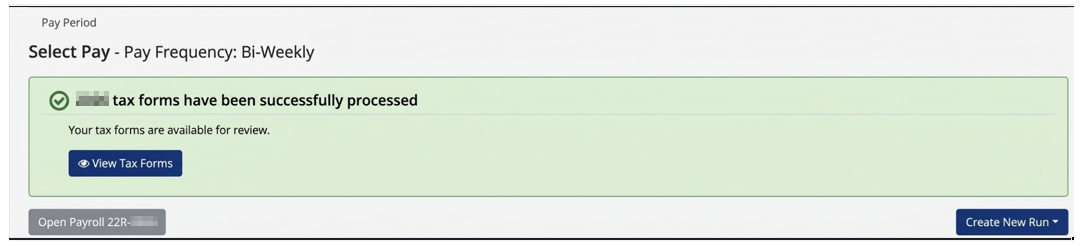
Once tax forms have completed, the banner will be green and has a link to your completed tax forms.
-
-
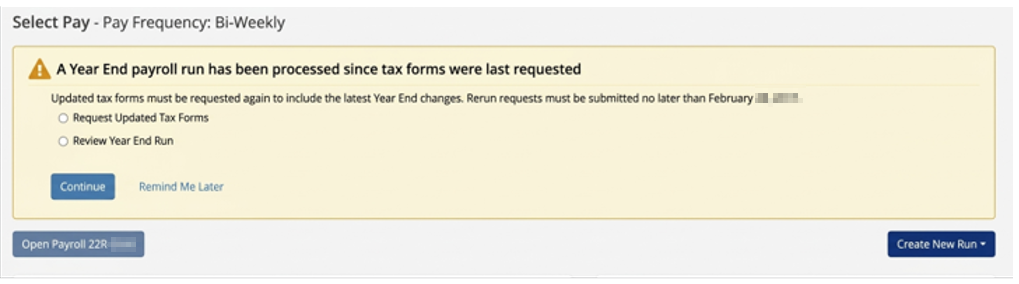
If you have processed a Year End Adjustment Run, the message will display the following, indicating that new tax forms are required. Same process applies – select Request Updated Tax Forms and click Continue. Powerpay will proceed through the steps to request the forms.
If you have any questions, contact your Customer Support Team.